










 Sale
Sale New
New Bestsellers
 Goods for babies
 Gifts
Gifts
 Materials for creativity
How to edit your profile and seller info?
1. To make changes to your personal profile, you need to go to the page Edit Profile in the upper right corner
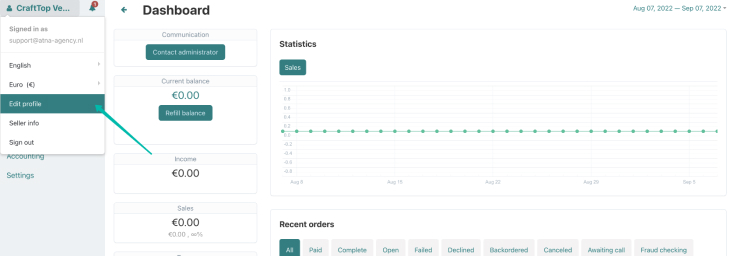
2. When you click on the button, you will see a page with all your personal information. Here you can change your personal details: name, password, phone, email and your address.
3. To make changes to your seller profile, you need to go to the page Seller Info in the upper right corner
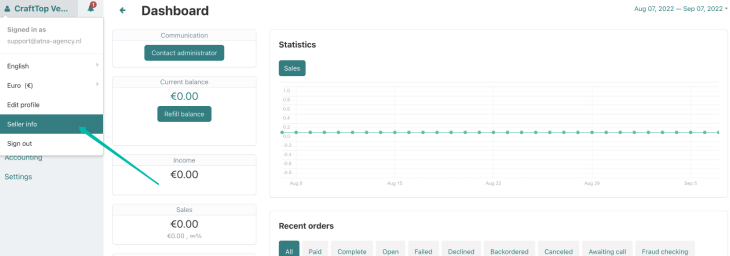
4. When you click on the button, you will see a page with all your seller information.
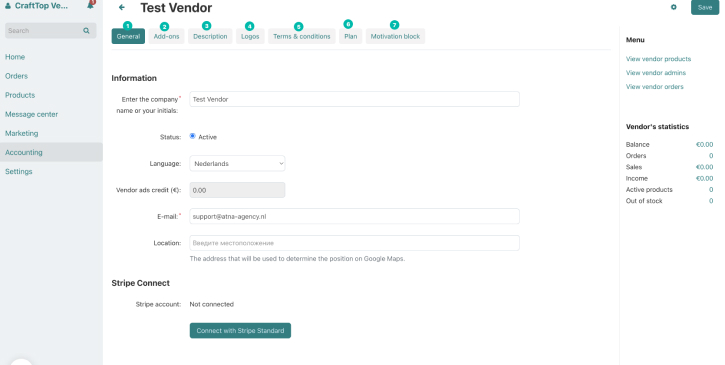
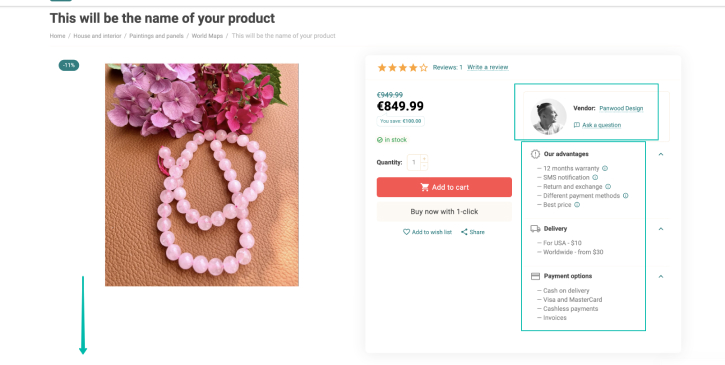
Here you see 7 tabs that are responsible for different information about your store. All the information that you fill in here will be displayed in your product card. (below is a screenshot of how it will look)
1 GENERAL - general information and connection of the payment system
2 ADD-ONS - here you can write a link, what will be the name of your store
3 DESCRIPTION - description of the store (describe in as much detail as possible what you do and what your advantages are)
4 LOGOS - here you can upload a logo or your photo
5 TERMS & CONDITIONS - here you can describe the conditions of your work
6 PLAN - general information about the conditions on which you cooperate with our platform
7 MOTIVATION BLOCK - here you can add information about payment, delivery and your benefits