











 Sale
Sale New
New Bestsellers
 Goods for babies
 Gifts
Gifts
 Materials for creativity
Opening A Stripe Account
To be able to sell your items through our website you must first connect a Stripe account (Stripe is our payment provider). Stripe gives us the ability to pay you when you get those orders flying in!
If you’ve not got a stripe account, fear not. For your convenience, we have created the instruction. Just follow these simple steps:
Steps to opening a Stripe account
To begin, visit Stripes website and begin filling out their forms. Fill out your email address, full name, create a password for your account and select your country.
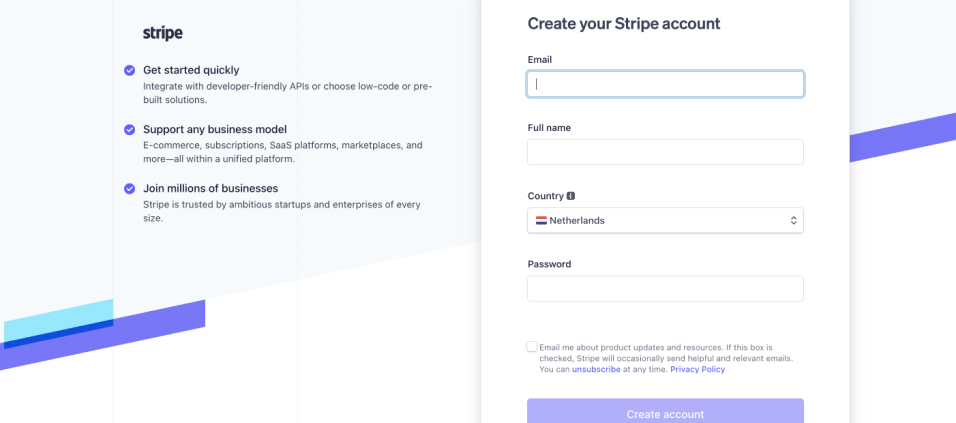
After this, Stripe will send you a verification email to complete the activation steps.
You must set up two-factor authentication after account verification to ensure the safety and privacy of your account. We recommend using Google Authenticator which is an app you can download on your mobile device.
After this you are ready to create your account.
Click on create account which should be on the top left corner of the dashboard screen.
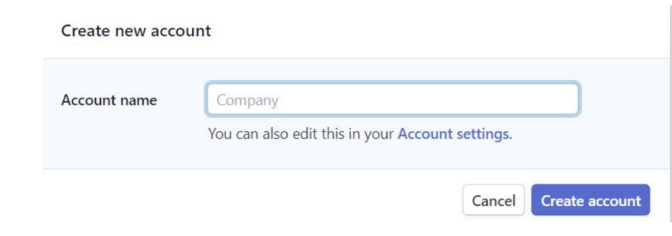
Enter your company name and select create account. You will then find yourself back on the dashboard page with a list of options on your left hand side, one of them being ‘Activate Your Account’.
Fill out your company's address as well as company type.
It is important to fill out the information in the next step as correctly as possible leaving no open spaces.
Then under business details on the left hand side provide a brief description of your LLC’s full name, your VAT, your service category, your website name, and your business.
On the left hand side you will see more steps to complete and fill them out one by one, being very careful that the information you are providing is correct.
Wait after completing these steps to allow time for processing. Sometimes it can take a couple hours sometimes it is immediate. If you have any problems, you can talk to an expert from the support section.
Once you complete these steps, you will have a verified stripe account!
If you had any trouble or complications while setting up your account, we recommend seeking help from the Stripe website support as they will be the most educated on the specifics within Stripe and the opening process.
 After you create your Stripe account, you need to connect it to your profile. See below how to do it.